

Overview Section (Dashboard):
This section shows the current mining status (miner performance, temperature indicators, connection to pools, hashboard status, cooling, and other indicators) that allow you to conytol the stability and efficiency of the miner.
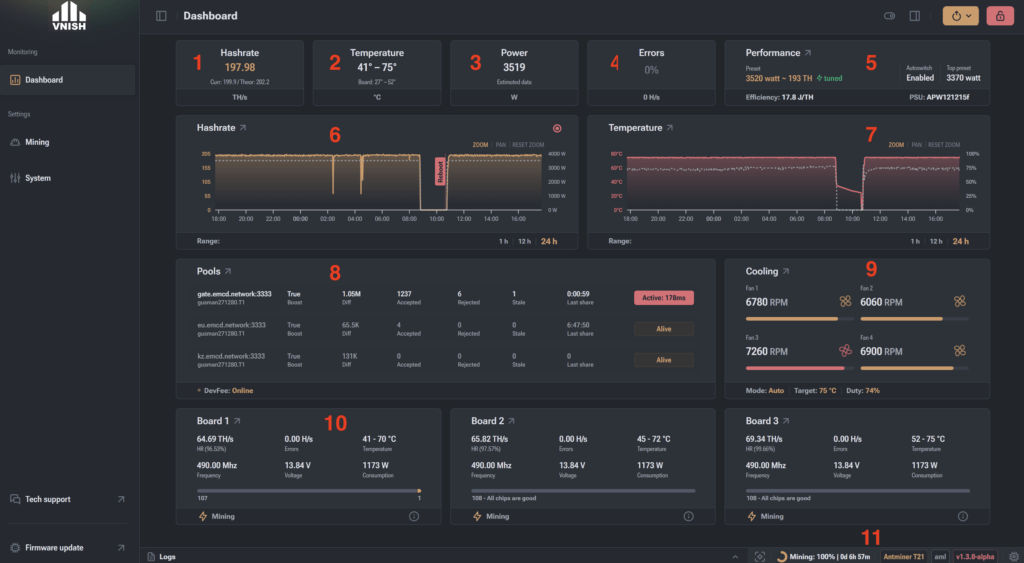
- Hashrate – the widget shows the average/current/theoretical hashrate of the miner. Data can be displayed in TH/s or GH/s depending on the miner type (SHA256 or SCRYPT).
- Temperature – the widget shows the minimum and maximum temperature of the chips and hashboards.
- Power Consumption – the widget shows the power consumption during current hashing, allowing you to evaluate the miner’s energy efficiency. For power supplies without a built-in wattmeter (19, L7 series), “calculated data” based on the selected preset is shown. For power supplies with a built-in wattmeter (hydro miners, 21, L9 series), the actual power consumption of the miner is shown.
- Errors – the widget shows the proportion of hashrate that contains errors and is not accepted by the mining pool as valid work.
- Performance – the widget shows the selected overclocking profile and efficiency. The green “tuned” label means that autotuning has been completed for this profile.
- Hashrate – the widget shows a 24-hour chart of hashrate and power consumption. On the chart, you can see hashrate drops and miner reboots.
- Temperature – the widget shows a 24-hour chart of temperature and fan speed.
- Pools – the widget shows pool difficulty (diff), number of accepted shares, number of rejected shares, number of stale shares for each configured pool, and allows you to manually switch pools.
- Cooling – the widget shows the cooling status of the miner (fan speed in RPM, percentage speed, set target temperature).
- Hashboards – the widget shows the status of the hashboards (hashing speed, errors, temperatures, frequency, voltage, power consumption, and number of unstable chips). This section may also display board errors and their explanations (overheating, chip detection error, temperature sensor error, PIC controller error, etc.).
- Miner Status – the widget shows the current mining status (autotuning, mining, error). You can also see: uptime, device model, control board type, and firmware version.